
Keryx
Move data fast. S3, peer-to-peer, or both.
ML-optimized. End-to-end encrypted. Resumable.
No telemetry. No usage tracking. Your data stays yours.
A fraction of the cost of Aspera or Signiant.
3.2 Gbps
S3 transfers
From datacenter to cloud
976 Mbps
From home internet
97.6% of gigabit pipe utilized
11.2x faster
Than SCP over WAN
Athens → Singapore via relay
See It In Action
2GB upload to S3 in 20 seconds. ML predicted 754 Mb/s, delivered 834 Mb/s.
2GB P2P transfer with real-time speedtest and bandwidth monitoring.
Benchmarked Performance
Real tests. Real networks. No simulations.
S3 Transfers (10GB to Wasabi)
| Route | Keryx | AWS CLI | Advantage |
|---|---|---|---|
| LA → San Jose (datacenter) | 3,219 Mbps | 1,121 Mbps | 2.9x faster |
| LA → Italy (datacenter) | 1,100 Mbps | 244 Mbps | 4.5x faster |
| Athens → Italy (home, behind NAT) | 903 Mbps | 238 Mbps | 3.8x faster |
| Athens → San Jose (home, behind NAT) | 579 Mbps | 176 Mbps | 3.3x faster |
All Keryx transfers include end-to-end encryption and BLAKE3 integrity verification.
AWS CLI and SCP do not verify file integrity. Full methodology →
Datacenter Performance (10 Gigabit)
CPU-Bound, Not Network-Bound
- 10 Gbps line, 2 vCPU datacenter instance: 1840 Mbps at 70% CPU
- Performance scales linearly with core count
- Add 2 vCPU → +20% throughput (tested up to 4 cores)
- Bottleneck is end-to-end encryption, not network
P2P Transfers (Residential Gigabit, 10GB File)
| Route | Time | Throughput | Encrypted | Verified |
|---|---|---|---|---|
| Keryx (Athens → Singapore via London) | 1m 24s | 976 Mbps | ✓ ChaCha20 | ✓ BLAKE3 |
| Keryx (Athens → LA via relay) | 1m 25s | 964 Mbps | ✓ ChaCha20 | ✓ BLAKE3 |
| Keryx (Athens → Singapore direct) | 1m 49s | 770 Mbps | ✓ ChaCha20 | ✓ BLAKE3 |
| SCP (Athens → LA) | 16m 24s | 87 Mbps | ✓ | ✗ |
Athens → Singapore: 15,000+ km. Relay routing through London. Line saturated at 97.6% utilization.
One Tool. Three Modes.
Cloud Mode
Direct transfers to S3-compatible storage.
- AWS S3, Wasabi, Backblaze B2, Cloudflare R2
- ML-optimized for your network conditions
- Resumable uploads and downloads
- Directory sync with structure preservation
Best for: client sharing, persistent storage, archival, scheduled sync
Direct Mode
Peer-to-peer through firewalls and NAT.
- No cloud, no egress fees, no waiting
- NAT traversal with automatic relay fallback
- Works through corporate firewalls
- End-to-end encrypted, relay cannot decrypt
Best for: 1-on-1 transfers, avoiding egress, ephemeral data, both online
Watch Mode
Set it and forget it. Automatic sync.
- Local ↔ S3 bidirectional sync
- Real-time file system monitoring
- Conflict resolution with archiving
- Mass change protection
Best for: continuous backup, cross-site sync, automated DR, media ingest
All three modes: encrypted, verified, resumable. One tool.
Desktop App
Clean interface. No learning curve.
Available for macOS (Apple Silicon), Linux, and Windows 10/11.
(Click to zoom)
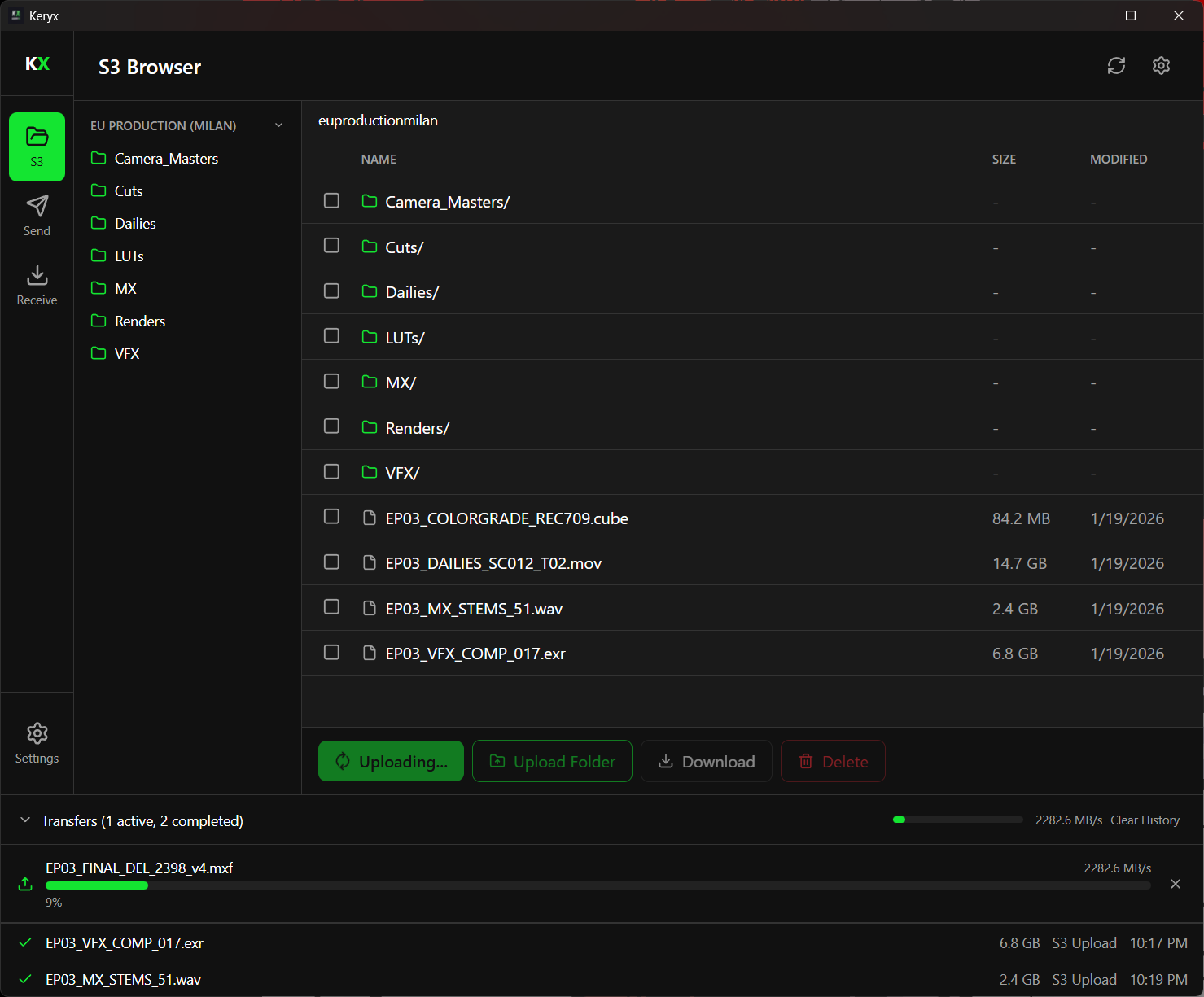
Post-production workflow. 32GB MXF uploading at 2.2 GB/s.
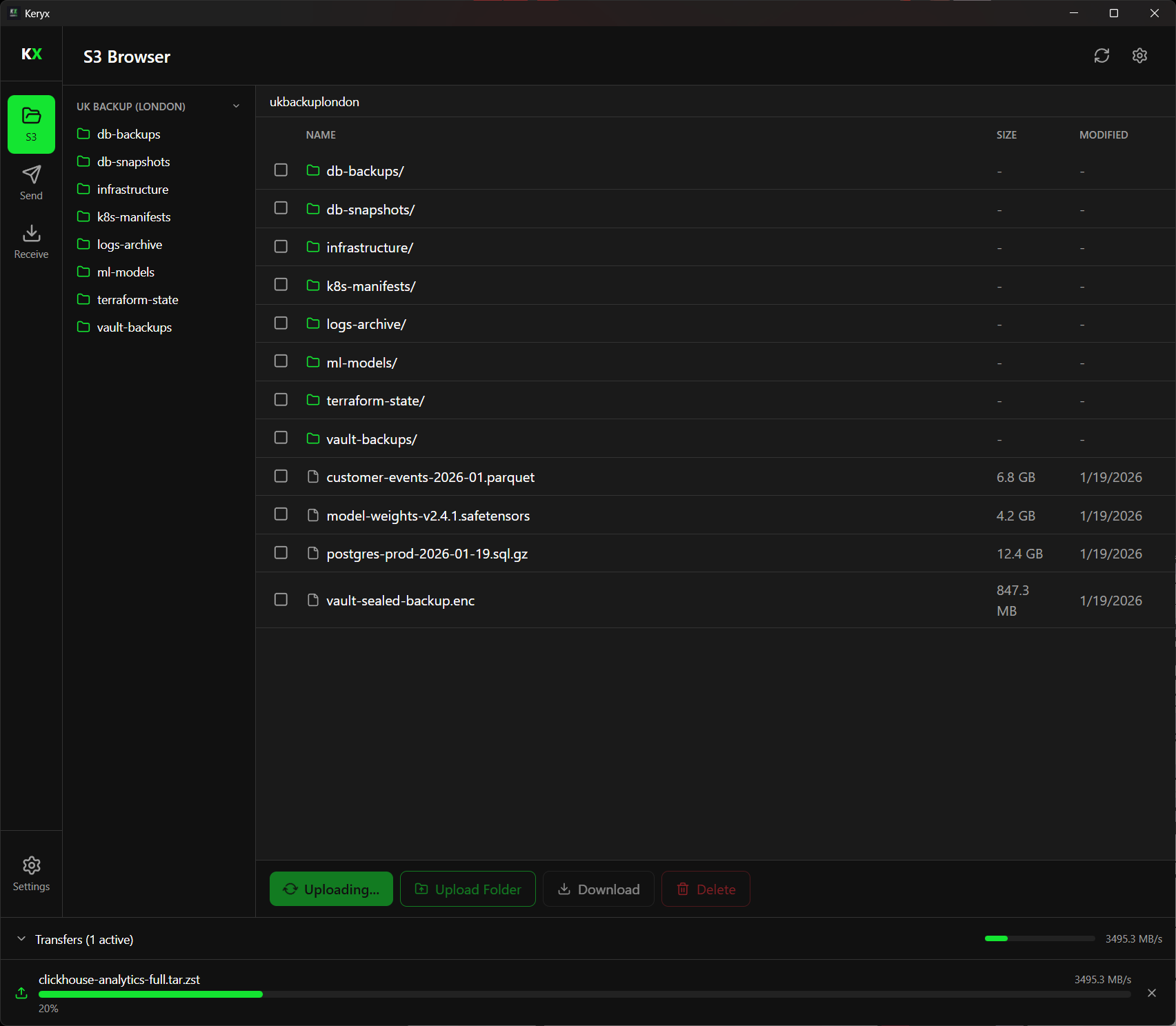
Infrastructure backups. Multi-region DR at 3.5 GB/s.
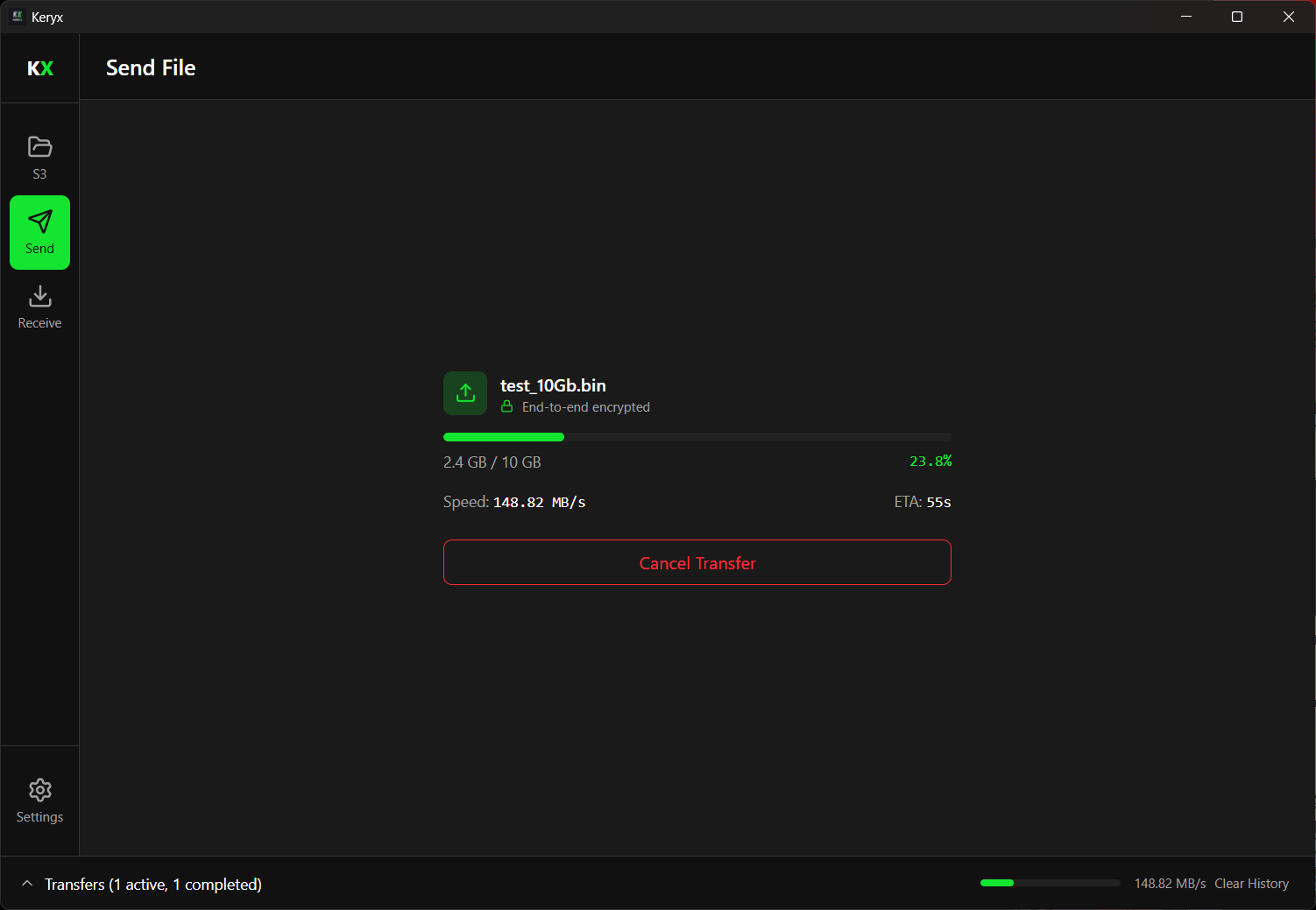
Direct P2P transfer. End-to-end encrypted, no cloud required.
Self-Optimizing Transfers
Keryx uses a contextual bandit ML algorithm that learns from every transfer:
- Adapts to your network conditions in real-time
- Gets faster the more you use it
- No manual tuning required
- ML decisions explained in real-time (optional)
[ML] Analyzing network conditions...
[ML] Selected optimal strategy for this route
[ML] Predicted: 754 Mb/s
[ML] Achieved: 803 Mb/s (+6.5%)
Transfer completed at 803 MB/s
Full visibility into ML performance. Your data, on your device.
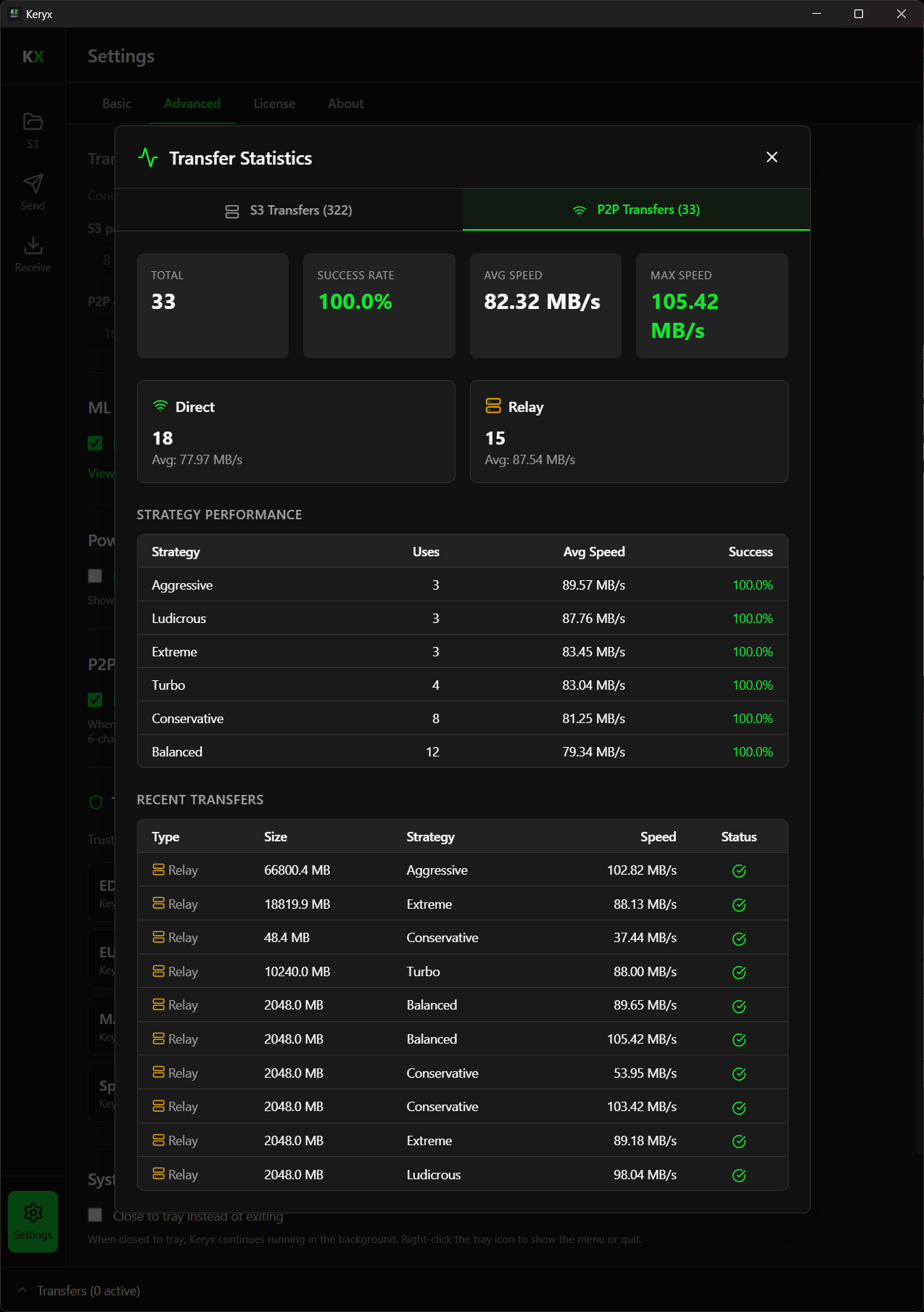
Power User Mode shows ML decisions in real-time.
Quick Start
P2P Transfer
# Sender (creates room)
keryx upload --p2p -f ./large-file.zip
# Output: Room code: ABC123...

# Receiver (joins room)
keryx download --p2p -k ABC123... -f ./output/
S3 Transfer
# Configure once
keryx config --name "My Bucket" --bucket my-bucket \
  --endpoint https://s3.wasabisys.com --region us-west-2

# Upload
keryx upload -f ./data/ -k backup/data/

# Download
keryx download -k backup/data/ -f ./restored/
Watch Mode (Auto-Sync)
# Add a watch rule (local folder → S3)
keryx watch add --name "Backup" \
  --source-type local --source ./projects \
  --dest-type s3 --dest backups/projects/

# Start the daemon
keryx watch start

# Check status
keryx watch statusFeature Comparison
How Keryx stacks up against the competition.
| Feature | Keryx | SCP | MASV | Aspera | Signiant |
|---|---|---|---|---|---|
| Direct P2P Transfer | ✔️ | ❌ | ❌ | ❌ | ❌ |
| Works Behind NAT | ✔️ | ❌ | ✔️ | ❌ | ✔️ |
| End-to-End Encryption | ✔️ | ✔️ | ✔️ | ✔️ | ❌ |
| Integrity Verification | ✔️ | ❌ | ❌ | ✔️ | ❌ |
| Resumable Transfers | ✔️ | ❌ | ✔️ | ✔️ | ✔️ |
| Real-Time ML Optimization | ✔️ | ❌ | ❌ | ❌ | ❌ |
| ML Data Stays On-Device | ✔️ | N/A | N/A | N/A | ❌ |
| Free CLI | ✔️ | ✔️ | ❌ | ❌ | ❌ |
Signiant uses TLS transport encryption; relay servers can access plaintext. Signiant ML is offline analytics, not real-time optimization.
| Feature | Keryx | AWS CLI | rclone | Aspera | Signiant |
|---|---|---|---|---|---|
| Real-Time ML Optimization | ✔️ | ❌ | ❌ | ❌ | ❌ |
| ML Data Stays On-Device | ✔️ | N/A | N/A | N/A | ❌ |
| Saturates Available Bandwidth | ✔️ | ❌ | ⚠️ | ✔️ | ✔️ |
| Per-Chunk Integrity Verification | ✔️ | ❌ | ❌ | ✔️ | ❌ |
| Resumable Transfers | ✔️ | ✔️ | ✔️ | ✔️ | ✔️ |
| Works Behind NAT | ✔️ | ⚠️ | ⚠️ | ❌ | ✔️ |
| Desktop GUI | ✔️ | ❌ | ❌ | ✔️ | ✔️ |
| Free CLI | ✔️ | ✔️ | ✔️ | ❌ | ❌ |
Signiant ML is offline analytics, not real-time optimization. rclone bandwidth saturation depends on manual tuning.
Pricing
Free Forever
Full speed. No throttling. No tricks.
Upgrade when you need GUI, multiple cloud profiles, automated sync, or relay fallback.
vs Competition
| Monthly Transfer | Keryx | MASV | IBM Aspera | Signiant |
|---|---|---|---|---|
| 50 GB | €39 | $220 | $950+ | $8,500+/yr |
| 500 GB | €119 | $220 | $950+ | $8,500+/yr |
| 2 TB | €199 | $1,100 | $4,750+ | $8,500+/yr |
| 10 TB | €449 | Custom | $19,000+ | Custom |
Plus: Keryx S3 and direct P2P transfers are free and unlimited. Competitors charge for everything.
No hard caps. Use what you need, get warned at 80% and 90%, pay overage at end of month.
Solo
€39/mo
50 GB relay included
- Everything in Free
- Desktop GUI
- Unlimited S3 profiles
- 50 GB relay bandwidth
- Email support
Overage: €0.20/GB
Plus
€119/mo
500 GB relay included
- Everything in Solo
- Priority support (24h response)
Overage: €0.10/GB
Pro Best Value
€199/mo
2 TB relay included
- Everything in Plus
- Premium support
Overage: €0.06/GB
Team
€449/mo
10 TB relay included
- Everything in Pro
- 5 seats included
- Team management
Overage: €0.04/GB
Enterprise
Custom
Unlimited relay
- Everything in Team
- Unlimited seats
- Dedicated relay server
- SLA & dedicated support
- Custom deployment
Desktop GUI: One month of any paid plan unlocks the GUI forever. Available for macOS (Apple Silicon), Linux, and Windows 10/11.
Updates require active subscription. Relay quota matches your plan.